



TCC & Partners, established in 2018, is an independent integrated marketing agency specializing in strategic and creative solutions to optimize cost-effectiveness and elevate brand value for our partners.
Phone: 0969293169
Email: contact@tcc-agency.com
Do you often struggle to watch YouTube videos offline without an Internet connection? The simple solution is to use TCC & Partner‘s YouTube Downloader. Our tool not only allows you to download video YouTube quickly and in high quality, but it also makes saving content convenient anytime, anywhere – just like how easy it is to download video Instagram with similar tools.
Fast and Free Youtube Video Downloader
Youtube Downloader – TCC Agency
Why choose YouTube Downloader to save YouTube videos?
In the digital era, videos are a major source of information, entertainment, and learning. Downloading videos allows you to watch offline, share, or edit content easily without relying on an Internet connection. YouTube Downloader is the ideal tool for this – fast, convenient, and completely free.
With a user-friendly interface and a powerful system, storing videos has never been easier, just as simple as using a tool to download video Instagram.
Key features of YouTube download video
- Fast Downloads: With our powerful server system, your video will be saved in seconds, saving you valuable time.
- Preserve Original Quality: Every downloaded video keeps its original resolution and audio, perfect for storage or sharing online.
- Accessible Anywhere: Supports multiple platforms, including iPhone, Android, PC, Mac, and tablets, all through the web without installing any apps.
- Unlimited Downloads: No daily limits – free and no login required, so you can download videos as much as you want.
- No Watermarks: Save the original video without any ID or watermark, making editing or sharing easier.
- Stable Performance During Peak Hours: The system is optimized for heavy traffic, ensuring smooth downloads at any time.
- User-Friendly Interface: Intuitive design and simple operation make it easy for anyone to download video YouTube or even download video Instagram without difficulty.
How to download video YouTube on your computer
Downloading YouTube videos on your computer is now extremely simple and fast. With just a few steps, you can save your favorite videos for offline viewing or for editing purposes.
Steps to Download YouTube Videos on PC:
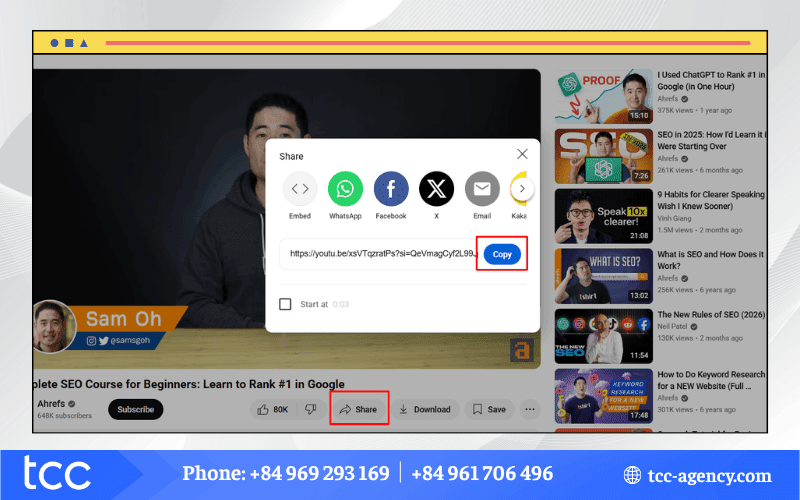
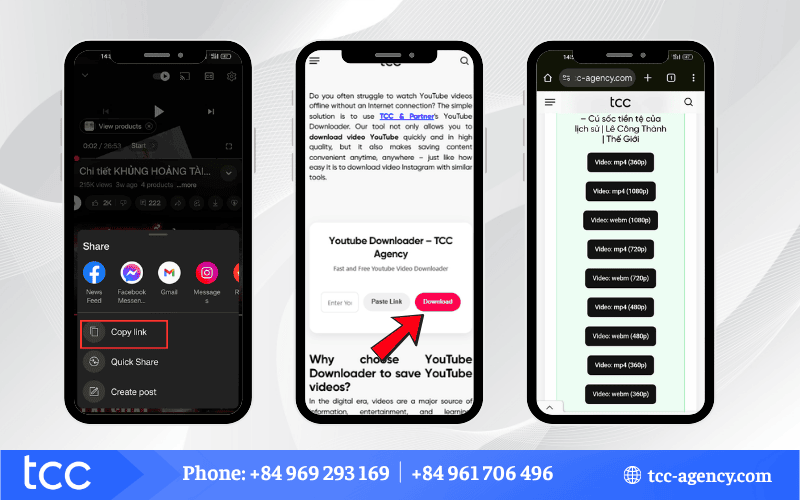
Step 1: Visit YouTube and Copy the Video Link
Open YouTube, find the video you want, and copy its URL.
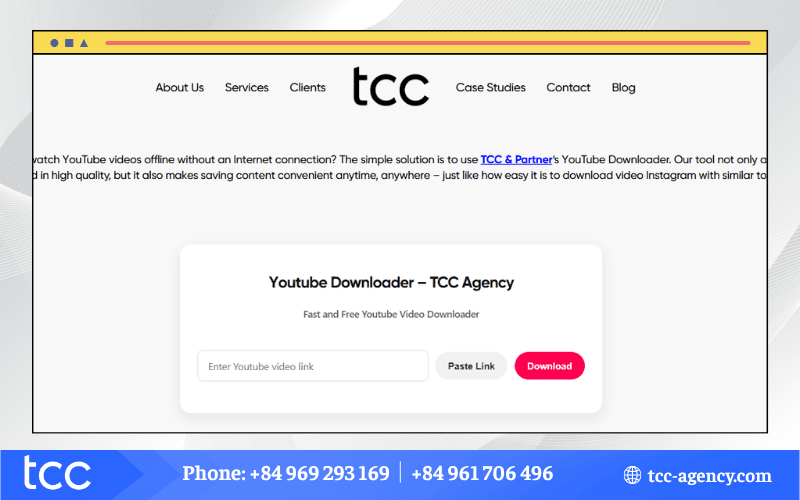
Step 2: Open the YouTube Video Downloader and Paste the Link
You can paste the link in one of two ways:
- Click the “Enter YouTube video link” box and press CTRL + V.
- Click the Paste Link button next to the input box.
Then, click Download to proceed.
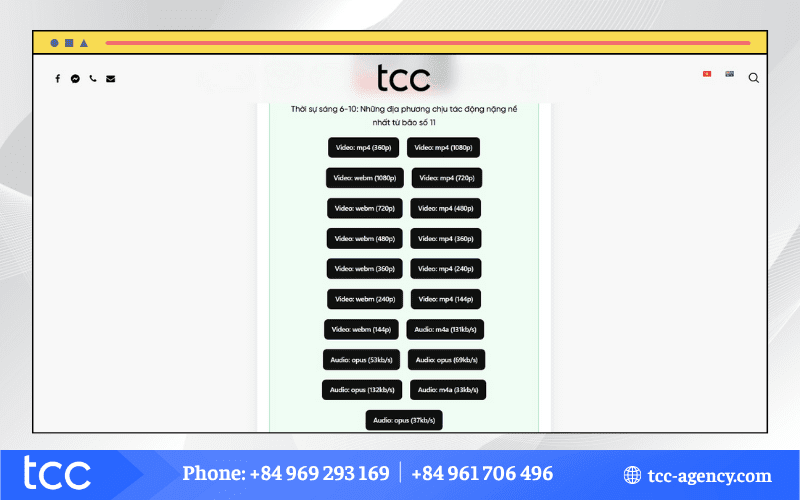
Step 3: Choose Download Options
Select your preferred video format and quality – multiple resolutions and audio options are available depending on your needs.
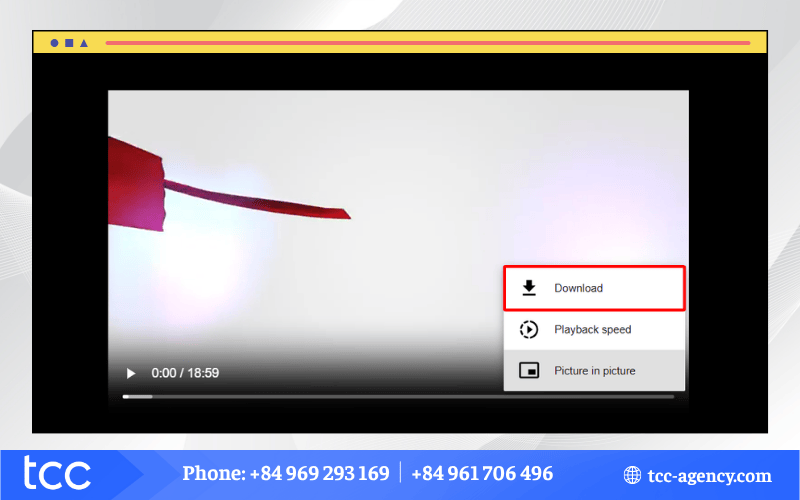
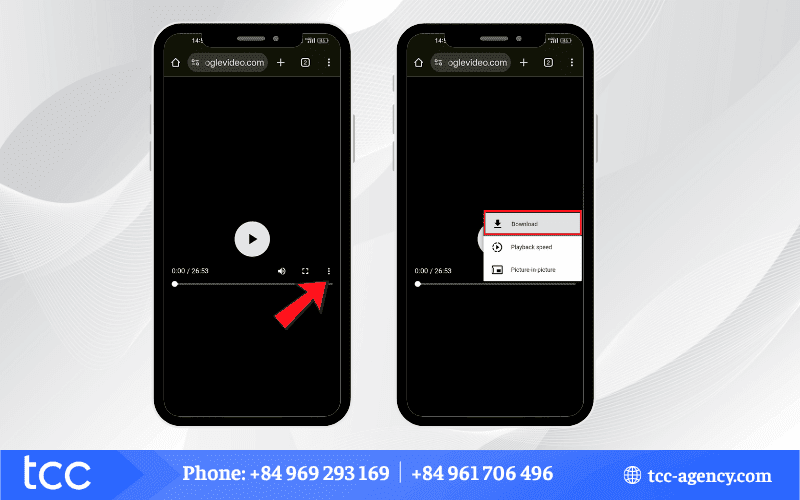
Step 4: Save the video to your computer
Click the three-dot menu next to the video, select Download, and the video will be saved directly to your device.
How to download video YouTube to your phone
Downloading YouTube videos to your phone allows you to watch anytime, anywhere without an Internet connection. With just a few simple steps, you can save your favorite videos directly on your iPhone or Android device for sharing or entertainment.
Download YouTube videos to Android
You can easily save YouTube videos on your Android phone to watch offline anytime. The process is quick and simple, and anyone can do it in just a few steps.
Step 1: Open YouTube, find the video you want, and copy its link.
Step 2: Go to TCC’s YouTube Video Downloader and paste the link in one of two ways:
- Click the “Enter YouTube video link” box and paste the URL.
- Press the Paste Link button next to the box.
Then click Download to continue and start your download video YouTube process.
Step 3: Choose your preferred video or audio format and quality.
Step 4: Tap the three dots next to the video, select Download, and the video will be saved to your Android phone.
Download YouTube videos to iPhone
No complicated software is needed, you can easily download video YouTube directly to your iPhone. Using TCC’s YouTube Video Downloader, the process is fast, convenient, and safe for all users who want to download video YouTube on the go.
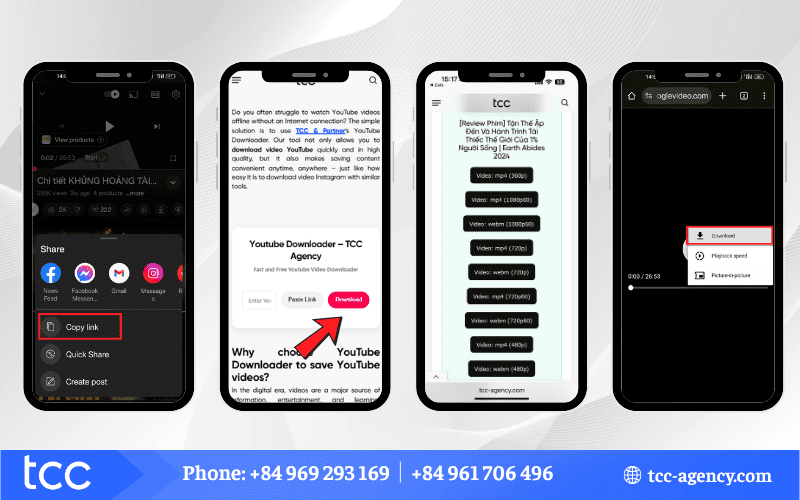
Step 1: Open YouTube on your iPhone and copy the video link.
Step 2: Go to TCC’s YouTube Video Downloader and paste the link:
- Click the “Enter YouTube video link” box and paste the URL.
- Press the Paste Link button next to the input box.
Then click Download to continue.
Step 3: Select the format and quality of the video or audio according to your needs.
Step 4: Tap the three dots next to the video, select Download, and the video will be saved directly to your iPhone.
FAQs about YouTube download video
Are you unsure how to use the YouTube Download Video tool or facing issues while downloading? Check the answers below to make your Download video YouTube experience faster, easier, and more effective.
Is YouTube Downloader free?
Yes, YouTube Download Video is a free online tool to download and convert YouTube videos. It works just like tools that let you download video Instagram quickly.
Which formats can I download YouTube videos in?
YouTube Download supports multiple formats such as MP4, Opus, WebM, M4A, and more. This is similar to the flexibility when you download video YouTube in different formats.
What is the maximum video quality I can download?
The tool supports SD, HD 720p, Full HD 1080p, and up to 4K resolution.
Can I download videos on both mobile and computer?
Yes, YouTube Download works online and is compatible with Android, iOS, Windows, macOS, and all major browsers – just like you can download video Instagram on any device.
Is there a limit on the number of videos or files I can download?
No, you can download unlimited videos and audio files.
Do I need to install an app or create an account?
No, the YouTube Download Video tool works entirely online, with no app installation or account required.
Is it safe to use YouTube Downloader?
Yes, the tool is safe and virus-free; however, it’s always recommended to use security software and respect copyright laws.
Is it legal to download YouTube videos?
It is only legal to download content that does not violate copyright. Downloading copyrighted content without permission violates YouTube’s terms and applicable laws.
Can I download subtitles or captions from videos?
No, the tool only downloads video and audio. Embedded subtitles are not included.
Can I convert videos to MP3 using YouTube Downloader?
Yes, the YouTube Download Video tool allows you to convert YouTube videos to high-quality MP3 files.
Start using TCC & Partner’s YouTube Download Video tool today to download video YouTube quickly, without watermarks, and easily on any device.
Note: Our tool is not affiliated with YouTube and does not store any content; all copyright belongs to the original owners – just like when you download video Instagram using trusted tools.

